# How to move out of Lovable Cloud
By [Sebastian Mertens](https://www.linkedin.com/in/auto-mate/) · October 21, 2026
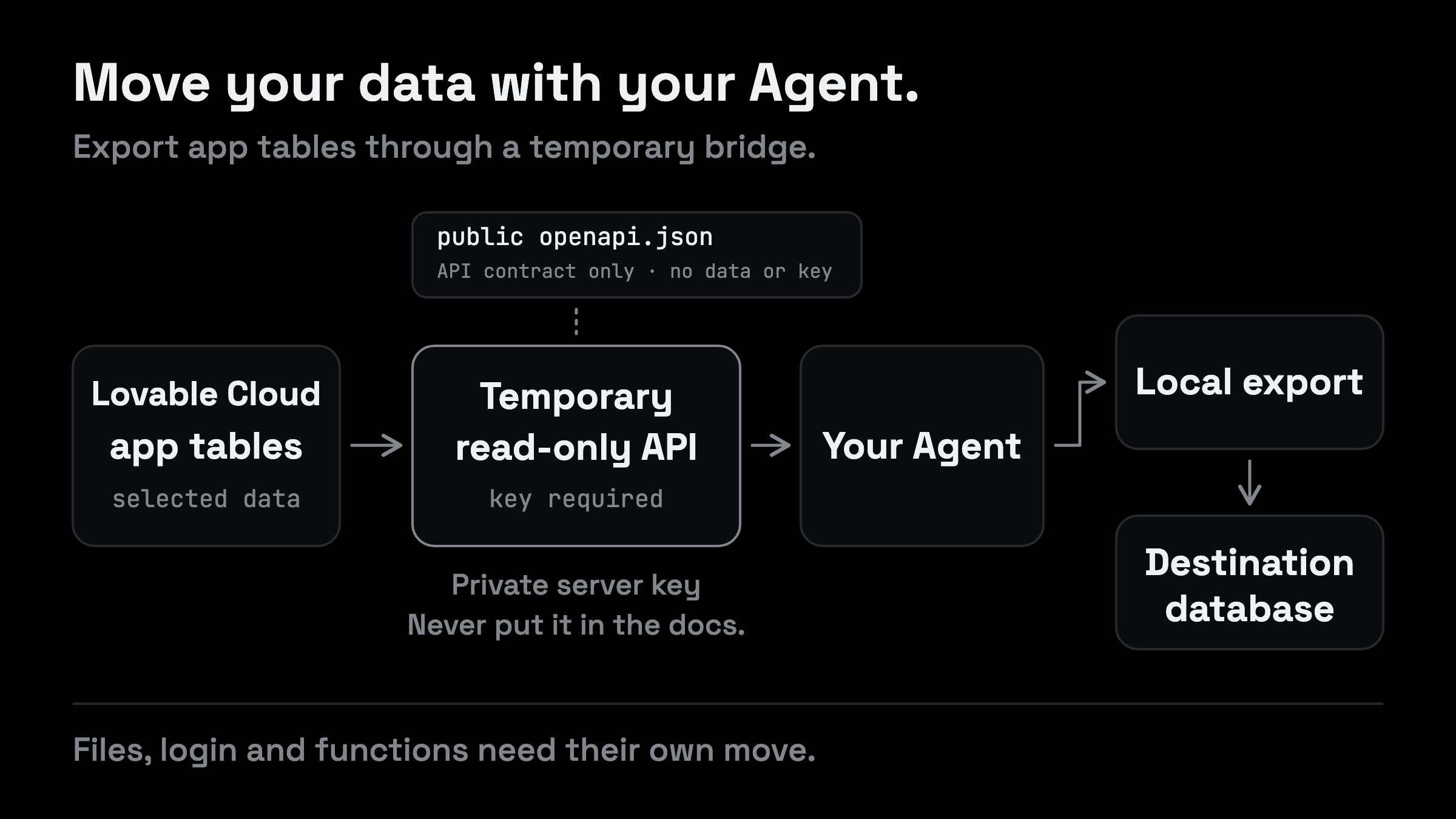
To move out of Lovable Cloud, your Agent needs more than the code in GitHub. It needs the data and a plan for the services your app uses. Check Lovable's database export first. If you need another way to copy your application tables, ask Lovable to build a temporary read-only API, then give that API to your Agent.
That is the bridge this guide is about. Lovable creates the interface inside your existing project. Your own Agent reads it, downloads the data and fills the database you want to use next. You give the Agent the job and check the result.
If your code is not in your own repository yet, start with the [Lovable GitHub export guide](/blog/how-to-export-lovable-code-to-github).
You can prepare that destination locally or on a host such as ohmyho.st. Keep in mind: copying table rows does not also move login accounts, uploaded files and everything your functions depend on. We will keep those visible throughout the move.
## Check the export you already have
If asking for a SQL password or connection address gets you nowhere, ask for the actual outcome: an export of your own project's data. Your Agent should check which authorized access this project provides before building another interface.
Lovable currently documents a full database export under **More → Database → Manage → Settings → Export project data**. It includes the database structure, records and authentication accounts with their password hashes. Files in storage and other service configuration are separate. The database must be running, and export size and frequency limits apply. Check the [current export documentation](https://docs.lovable.dev/features/database-backups#export-your-database) for your project.
Here a prompt for your Agent:
```text
I want to move this app out of Lovable Cloud. Inspect the repository and list the backend services it actually uses.
Check the built-in database export for my project. Tell me whether it fits the destination or whether a temporary read-only API would help with selected application tables.
Tell me what each option includes, what is missing and what needs to happen at the destination. Do not change the source database or switch the live app yet.
```
If the built-in export fits your destination, let your Agent use it. Ask it to plan the restore, especially if the destination already contains tables or records. A full database archive and a collection of JSON rows need different import steps.
The API route below is useful when you deliberately want your Agent to copy approved application tables into a database you have already prepared. It is a custom workflow to implement and verify, not a built-in Lovable export feature.
The API is a temporary bridge for approved application data. Its public documentation contains no records or keys. Files, login and functions have their own migration steps.
## Ask Lovable for the API
Tell Lovable what you need. You want to export your own application data. If you are connecting an external frontend, explain that real use case. Give it a concrete feature to build: an authenticated interface that can read a defined set of tables.
You can ask for all of your application tables. Have Lovable list them first, including the fields it proposes to expose. That makes “all” something you can check. System tables, login credentials and private service settings do not belong in this general export interface.
Here a prompt to paste into Lovable:
```text
I own this project and want to export its application data to a backend I control.
List the application tables and fields first so I can confirm the export scope. Then build a temporary HTTPS read-only API for that approved list. Enforce read-only access on the server; do not accept arbitrary SQL or expose write operations, auth internals or secrets.
Require a new private export key in the X-Export-Key header on every data request, alongside any platform authentication that is required. Give it an enforced expiry and a way to revoke it. Tell me where to set it securely without putting it in chat or source code.
Return bounded pages with a stable unique cursor and a clear end-of-data signal. Test that missing, invalid, expired and revoked keys fail, unapproved data cannot be requested and no source data changes.
```
Lovable may need to explain a platform constraint or ask you to configure something. Let it do that. Do not treat a generated route as finished until the authentication and scope checks pass.
Keep in mind: read-only means the caller should not be able to change the data. It does not mean the data is public. A read-only endpoint can still expose every record it returns.
## Set a private export key
Ask your Agent to generate a strong random token and help you put the same value into Lovable's server secret configuration and your Agent's private local configuration. Use the supported private input flow. Lovable documents secure secret entry in its [secrets guide](https://docs.lovable.dev/features/secrets).
Do not reuse your login password. Do not place the token in a URL, public repository or the API documentation. The export key belongs with the Agent doing the transfer, not in a frontend that every visitor downloads.
This custom key is also different from a privileged database credential. The API may use privileged access internally, but it must keep that credential on the server and enforce the approved export scope itself. [Supabase's key guidance](https://supabase.com/docs/guides/getting-started/api-keys) explains why secret and service-role credentials need that separation.
You should end this step with a working API address and a privately configured key. You do not need to paste the key into the next prompt.
Here a prompt for your Agent:
```text
Help me set the same fresh, strong random export key in Lovable's server secret configuration and your private local configuration. Use the supported private input flow and do not print the key here.
Once it is set, verify an authenticated read and check that the same request without the key fails. Tell me the result without showing private records.
```
## Give your Agent the API documentation
Now ask Lovable for an `openapi.json` file. This tells your Agent which endpoints exist, how to authenticate and how to read the responses. You do not need a documentation website for this handoff.
Here a prompt for Lovable:
```text
Create a valid OpenAPI JSON document for the export API you just built and make it available at /openapi.json.
Document the actual server URL, approved read endpoints, required authentication headers, pagination, limits and errors. Define lossless response formats for large integers, exact decimals, timestamps, binary values and nulls. Check that the document matches the deployed API.
The JSON may be publicly readable, but it must contain no real API key, private records or sensitive examples. Describe only the approved export contract. Keep all data routes authenticated. I only need the JSON file, not a documentation website.
```
Open that address and check that it returns JSON. Then give the URL to your Agent. The document describes access; the server still has to enforce it. That is the distinction behind [OpenAPI's security schemes](https://learn.openapis.org/specification/security.html).
If the endpoint still needs a platform gateway or an extra authentication header, the document must say so. Your Agent needs the interface that actually works, not a guessed direct database address.
## Download the data first
Before filling the new database, have your Agent save a local copy. That gives you a checkpoint if an import fails or you need to change the table mapping.
Here a prompt for your Agent:
```text
Use the export API described at [OpenAPI URL]. Read the approved read endpoints and use the export credential from my private configuration. Do not print the credential or put it in a URL.
Before the first page, choose a captured consistent export or clearly label this a live rehearsal. Explain how changing records will be handled, and ask before pausing any writes for a final transfer.
Download every page for each approved table into a private local folder. Preserve IDs, values and types. Save a manifest with the export version or consistency limitations, table names, row counts, checksums and errors. Resume only against the same unchanged export; otherwise restart or reconcile rather than mixing versions. Report incomplete tables instead of silently skipping them. Do not write to either database yet.
```
Your Agent should return the folder location and a short report. Check that the expected tables are there. Ask about empty tables and missing fields rather than assuming an empty response proves there was nothing to copy.
Also decide when the final copy happens. If people keep adding, changing or deleting records while the Agent reads page after page, those pages may describe different moments in time. Stable pagination does not freeze the database. [PostgreSQL's transaction documentation](https://www.postgresql.org/docs/current/transaction-iso.html) explains how database snapshots differ from separate reads.
For a trial, a live copy may be enough to test the importer. For the final move, ask the Agent for a consistent export or a planned pause in all writes with a final reconciliation. Include background jobs in that plan. A working download alone is not proof that the latest changes have arrived.
## Fill the database your Agent prepared
If your Agent already created the destination and applied the migrations, tell it that. It should inspect what is there, compare the structure and fill it. It should not start again or overwrite existing records just because it received an export.
If the destination is not ready yet, ask the Agent to prepare an isolated development database from the repository's migration history. Have it compare that history with the approved source tables before importing. Lovable documents the migration layouts in its [database guide](https://docs.lovable.dev/features/database).
Here a prompt:
```text
Use the destination database you prepared and the export we downloaded. Check both before importing the approved application data into an isolated development destination. If the destination is not clear, ask me which one to use.
Compare the source and destination structure. Preserve primary keys, relationships, timestamps, nulls and value types. Plan table order and identity-sequence handling, and make retries safe without creating duplicates.
If the destination already contains data, report the conflicts and propose a merge policy before changing it. Do not drop or truncate tables, disable access rules or overwrite existing records without my decision.
Keep destination jobs and real email, payment and webhook actions disabled or sandboxed during rehearsal. Preserve authentication user IDs where supported, or verify an explicit mapping so records still belong to the right users.
After the import, compare counts, missing or extra keys, sample values and relationships. Save rejected rows in a private report; summarize their counts, IDs and reasons, and give me named records to check in the app.
```
The useful result is a report you can read and an app you can open. Pick a few records you recognize. Do their related records appear? Are dates and amounts still correct? Can the right account see them?
Counts are a starting point. Matching totals do not tell you whether the same records arrived or whether the app still applies the right access rules.
## Move the parts outside your tables
Your Agent needs to account for the rest of the app before calling this a completed migration.
| Part of the app | What your Agent needs to handle |
| --- | --- |
| Application records | Import the approved rows and verify their values and relationships |
| Login accounts | Use a compatible authentication migration; profile rows alone are not login accounts |
| Uploaded files | Transfer the actual files and check access, not only their database references |
| Server functions | Find the source code, deploy or adapt it and configure its secrets |
| Scheduled work and integrations | Check where jobs run and which external services they still call |
The full database export can include authentication password hashes. A compatible Supabase restore can preserve passwords, while sessions and sign-in providers need separate handling. A normal JSON user list is not the same export. Ask your Agent which migration your chosen authentication system supports. [Supabase's authentication migration guide](https://supabase.com/docs/guides/troubleshooting/migrating-auth-users-between-projects).
File rows also are not file contents. The Agent needs to transfer the objects and verify that the app can retrieve them. [Supabase's backup documentation](https://supabase.com/docs/guides/platform/backups) makes that distinction explicit.
Edge Function source can be available in `supabase/functions/`, so your Agent can inspect it in the repository. That does not make every function portable without changes. Secrets, schedules and runtime dependencies still need attention; TanStack Start server functions are another case. Lovable's [migration guide](https://docs.lovable.dev/tips-tricks/external-deployment-hosting) describes these separate moves.
If your destination is plain PostgreSQL or ohmyho.st, ask the Agent how it will handle the Supabase services your app currently uses. A database connection alone does not replace authentication, storage and functions.
## Check the app and finish the move
Point a test version at the new backend first. Keep the current app available while you test the replacement.
Here a prompt:
```text
Give me a test version of the app connected to the new backend. Check migrated records, login, protected access, uploads, functions and scheduled jobs. List remaining Lovable Cloud, AI and connector gateway dependencies.
Give me the URL and a short set of real app actions to try. Then propose the final data transfer, traffic switch and recovery plan, including when to enable destination jobs and external side effects so they do not run twice. Ask before changing the live app.
After the verified switch, revoke the temporary export key, remove the export routes and confirm they reject further access. Keep the source and backups until we have agreed they are no longer needed.
```
Open the test URL and use the app as you normally would. Sign in with a migrated account, open a familiar record and retrieve an uploaded file. Tell your Agent what is missing before switching the live address.
We build ohmyho.st. If that is your destination, ask your Agent to follow the [Supabase migration Skill](https://docs.ohmyho.st/skills) for the services you choose to move, then prepare a Dev deployment for your review. Our [Lovable hosting guide](/blog/host-a-lovable-app-after-export) covers the hosting handoff.
## FAQ
### Do I need a custom API to move out of Lovable Cloud?
No. Check the built-in database export and the access available to your project first. The temporary API is an option for transferring approved application tables. Lovable also documents an [MCP server for external Agents](https://docs.lovable.dev/integrations/lovable-mcp-server). Its database tool supports writes and schema changes too, so review that broader access before connecting it for an export task.
### Can the API export all my tables?
It can be designed to export all approved application tables. Ask for the inventory and a completeness report. System data, authentication internals and storage files need their own handling; do not describe this row export as a complete backup of every service.
### Can I keep using the same API after the move?
If the goal is to leave Lovable Cloud, the new app needs to stop depending on that bridge. Treat it as temporary export access. A permanent external frontend is a different integration with its own user authentication and access rules.