Hosting a Claude artifact on your own domain
To host a Claude artifact yourself, copy its code from the chat into a project, extract inline scripts and inline styles into separate files, and have your agent review the project on ohmyho.st in Dev and then publsih it to Prod. The link to claude.ai remains a share—it is not your own website.
A single prrompt in the same chat is all you need to get started:
Turn the artifact above into a Vite project. Move every inline script and inline style into its own file, keep the look unchanged and list the files.
Then read https://ohmyho.st/llms.txt and the get-started Skill, create the project on ohmyho.st, build it in Dev and give me the preview URL. Ask me before you publish to Prod or connect a domain.
This guuide explains what an artifact link provides, what it doesn't provide, and which parts aren't included when you move your site. It's intended for websites and small tools that you've previously shared only via links and that you want to run under your own domain.
What Is an Artifact Link?
According to Claude Help, an artifact is anything Claude creates for you that you want to show someone: a design, a presentation , a document, a dashboard, or a small interactive tool. It opens alongside the conversation; you can edit it, open it agian later, and share it.
Artifacts start out private. Nothing is shared until you sare it. Then, depending on your plan, you have several options: a link for anyone who has it, an email invitation, or—for Team and Enterprise plans—sharing within your organization. The help section lists how to share via a link for the Pro, Max, Ultra, and Team plans. On the Free plan, you can still publish older chat artifacts.
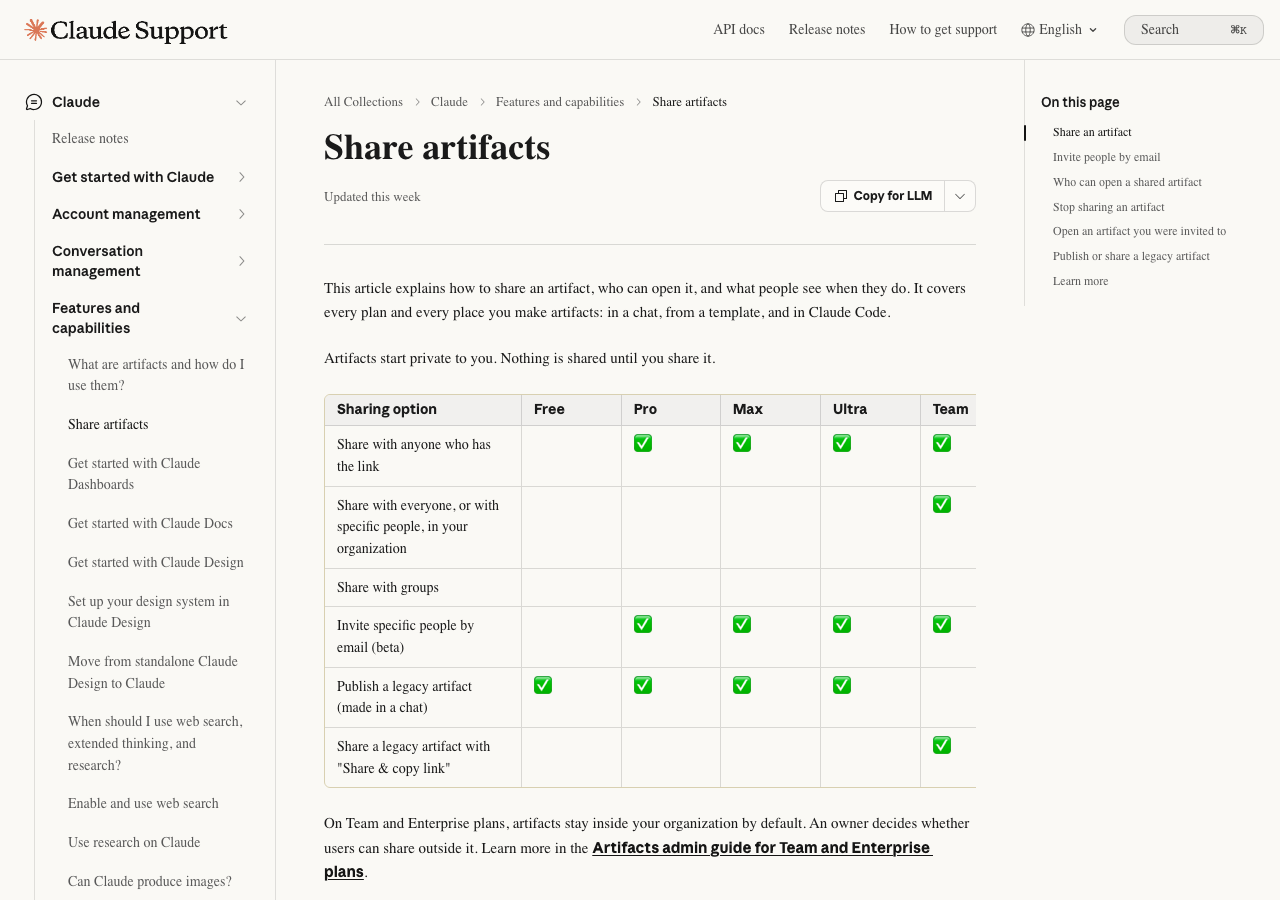
Important for the migration: All of these paths lead to an adddress on claude.ai. If you want to open a shared artifact, you generally need a Claude account. The exception is a published older chat artifact , which can be read without an account. The help section does not mention using your own domain or hosting in these instances.
What Will Change When You Move
At your own address, the site is a norrmal website. Anyone can open it; you decide on the domain and what runs in the background. In return, the site also includes what Claude took from you in the chat.
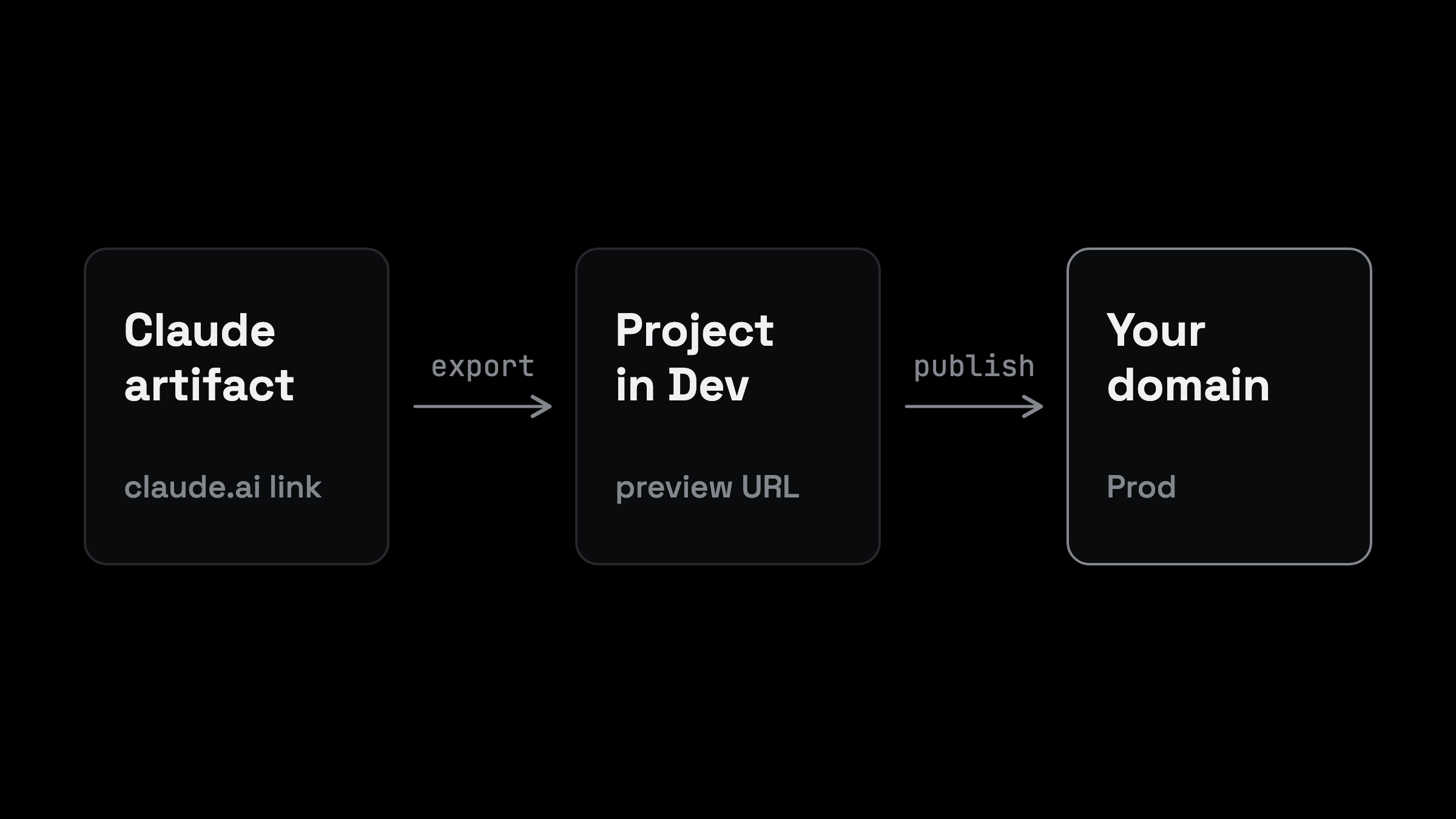
An artifact is usually a single HTML file that contains styles and scripts directly in the code. That is precisely the first hurdle. The page for Vite projects on ohmyho.st lists this among the limitations: Inline scripts and inline styles are not allowed there; external resources require declared browser orignis. So your agent must split the code into separate files before the page loads. The details are in the Guide to Vite and React.
How to host a Claude artifact on your own domain
- Get the code. Open the artifact in the chat , copy the sourrce code, or download it. For designs, Claude lets you export them as standalone HTML files. If the ohmyho.st connector is integrated into Claude, your agent doesn't even need to download the code.
- Extract scripts and styles into separate files. Every
<script>and every<style>in the doument becomes its own file. The appearance must not change. - Check what's coming from outside. Fonts, libraries , and images from external sources must be declred or added to the project.
- Build in Dev. Open the preview, click through the page , and reolad a specific subpath directly.
- Publish and connect the domain. Only once the preview looks right shoulld the same tested version be deployed to production.
If you prefer to work in the editor , assign the task to your agent in this formaat:
Read https://ohmyho.st/llms.txt and the get-started Skill. Create a Vite project from the HTML file artifact.html in this folder. Move every inline script and style into separate files and keep the page identical.
Run the production build, deploy it to Dev on ohmyho.st and give me the preview URL. List every external address the page loads from. Ask me before publishing to Prod or switching a domain.
What's Not Included
An artifact contains more than just the viisble code. Some features are only available within claude.ai , and you won't realize that until after the migration.
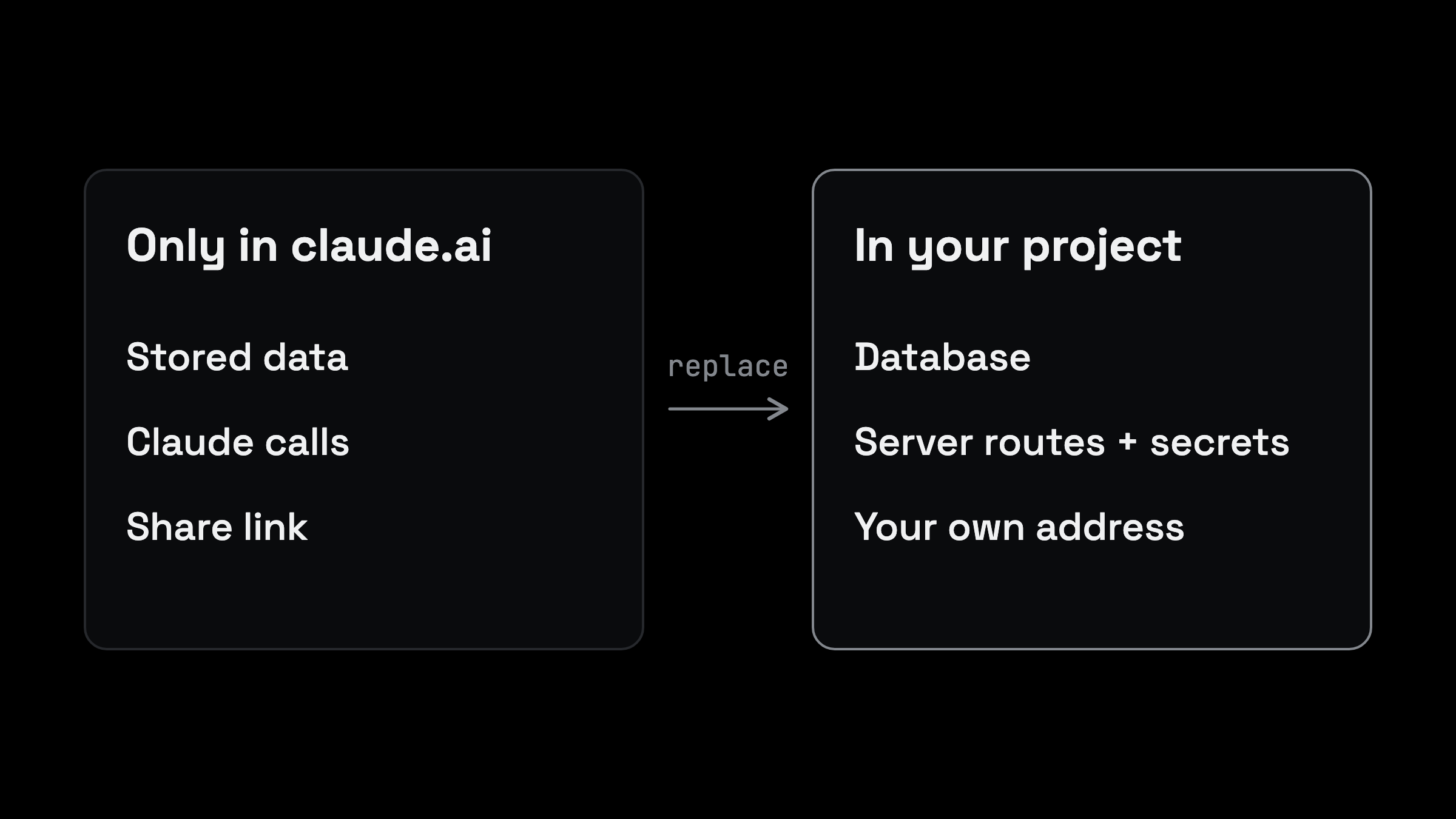
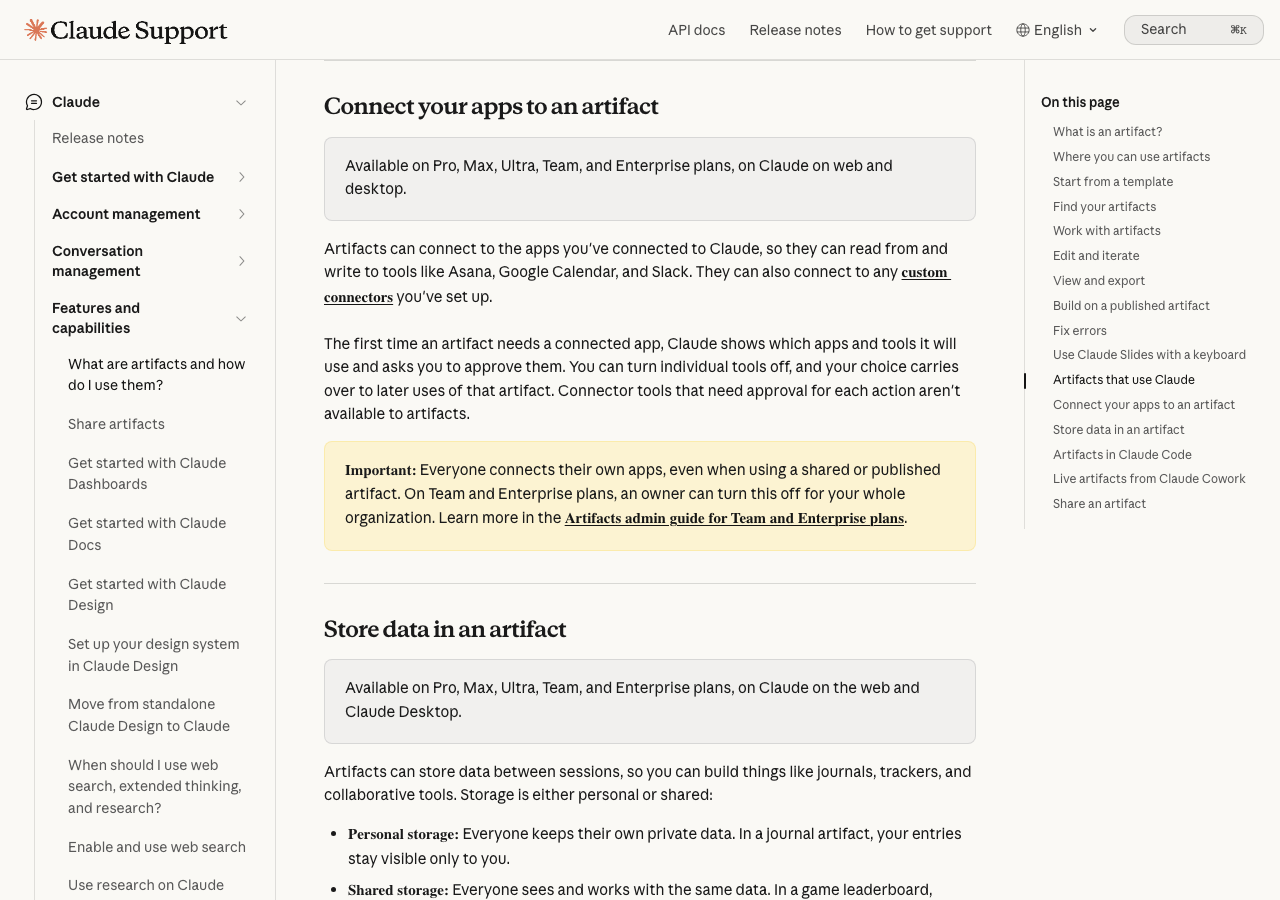
Stored Data. According to the Help section, an artifact's storage can only hold text and has a limit of 20 MB per artifact. Personal storage is private; shaerd storage is visible to everyone who uses the artifact. When you move, this data remains in Claude. For the new site , you’ll need your own database. Your agent will set it up as soon as it’s determined what needs to be stored.
Calls to Claude. Within an artifact, the logic itself can call upon the Claude model. The help section explains that the app then runs on Anthropic’s infrastructure and users log in with their Claude account. This account does not exist on your domain. If the site is to continue calling a language modl, it needs its own server component with its own API key, which is stored as a secret and never ends up in the browser.
Connected Apps. Connections to your apps are tracked per person within the artifact. This feature is also exclusive to the artifact. A standalone site requires a sepaate solution for each connection.
Share and Delete. The link on claude.ai remains unchanged. When you unpublish an older chat artifact, Claude permanently deletes the stored data, and the artifact cannot be republished. Therefore, do not unpublish untl the new page is up and running and the data has been backed up.
If the page requires a server
Many artifacts are purely front-end applications. As soon as you save data, call a model, or send emails , a server component is added. In Vite projects, this is handled by a companion with routes at /api that are accessible from the same origin. Privaate values are stored in runtime secrets, not in the code.
That's where hosting through an agent pays off. You don't have to decide which services to link together. Your agent reviews the project , suggests what's missing, and asks you before publising anything.
First , let's take stocck of the situation:
Read the artifact code in this project. List everything that only works inside claude.ai: stored data, calls to Claude, connected apps and sharing.
For each item tell me what the page needs instead on its own domain, and which parts need a server. Do not change anything yet.
Adopt Someone Else's Code
You can also continue working on someone else's artifact. The help section explains how to do this using the code: copy it, paste it into a new chat, and describe any changes. Your version remains separate from the original. The help section waarns that you should only do this with artifacts from people you trust.
Treat this code as if it were a file from a stranger. Before running it on your dommain, have your agent review it and list all the addresses , forms, and scripts that send data.
FAQ
Does it cost anything to host an artifact?
You start with 200 free creedits. How much the site uses after that depends on whether it only serves files or also uses a server component , a database, or email. Ask your agent about usage before publishing.
Will the Claude call in my artifact still work after the move?
No , not on its own. The call is made within the artifact when users log in to Claude. On your domain, you'll need a separate servr component with its own API key. Your agent can set it up, and you'll need to store the key as a secret.
Can I continue to use the artifact link?
Yes. The link to claude.ai will continue to work regardless of your new site , as long as you don't revoke acecss. The two versions will develop separately from each other after the migration.
Do I need programming skills?
You don't have to write the code yourself. You decide what the page should do and cehck the preview. Your agent handles the deployment , building, and publishing.
Assign the task to your agent
Your artifact will no longer just appear as a link in a chat, but as a page at your address. Let your agent know if you'd like to see a preview first or connect the domain rgiht away.
For instructions on how to get from an exported app to a live site, see Hosting an Exported Lovable App. If you want to use your own agent instead of a built-in assistant, read Using Your Own Coding Agent Insead of Lovable. The technical limitations for static apps are listed on the page Hosting Vite and React.