A Lovable alternative with your own LLM: Claude Code, Codex, Cursor or Grok
By Sebastian Mertens · September 25, 2026
The Lovable alternative most builders need is not another app builder. It is the coding agent they already pay for (Claude Code, Codex, Cursor or Grok Build) working on the same repository, plus a host that agent can operate. Lovable exports to GitHub in a few clicks, and your agent deploys from there to ohmyho.st with one prompt.
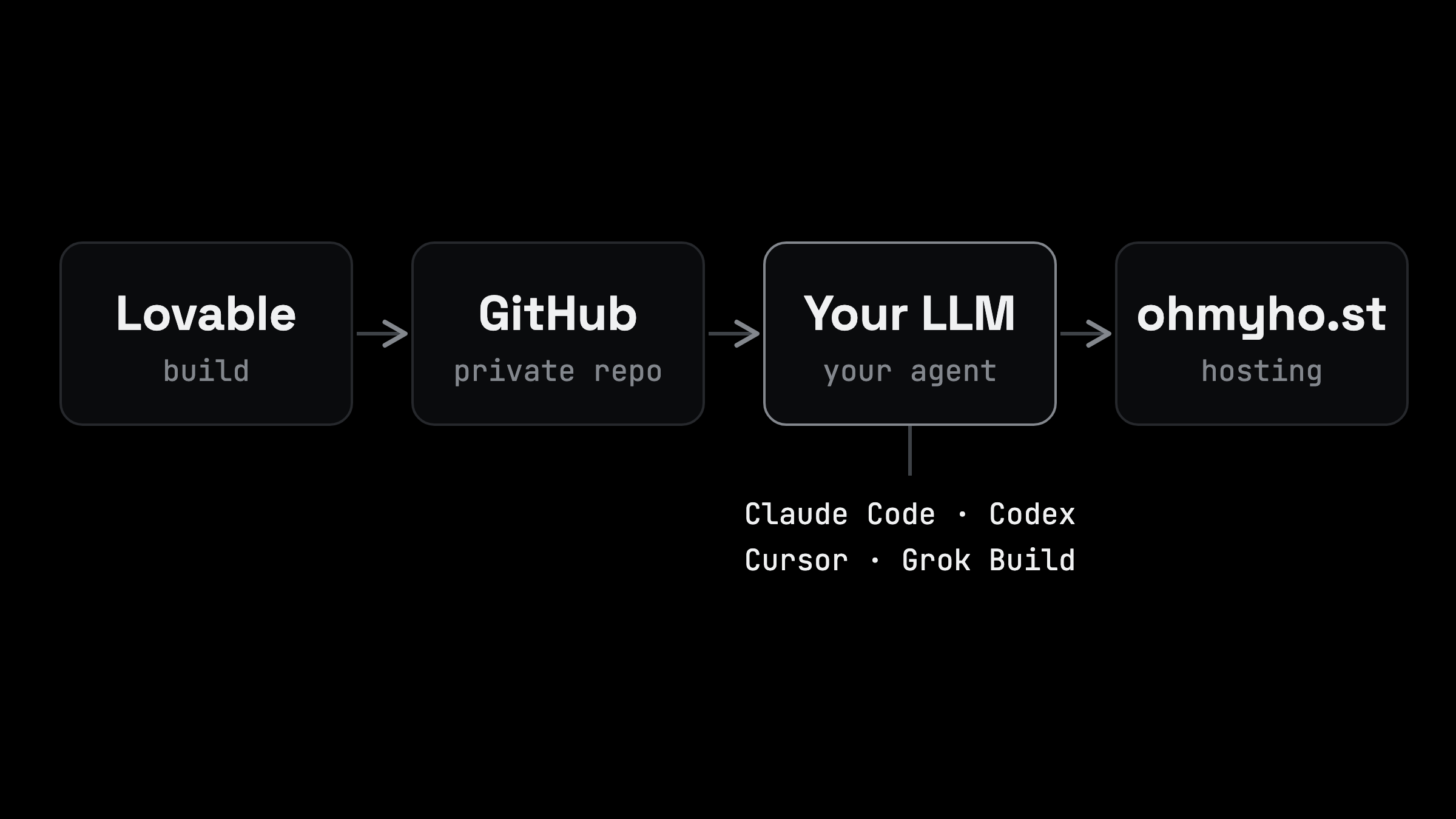
Why builders look for a Lovable alternative
Lovable is very good at the first version. You describe the app, watch the preview, and get a working Vite and React codebase in an afternoon. The friction starts later, and it is almost always about the meter, not the code.
Lovable measures everything in workspace credits. Its pricing page says credits from your balance are used "for building by sending messages to Lovable, hosting with Cloud, and offering AI features to users", and in the default mode each message costs a variable amount that depends on how complex the task is (Lovable pricing, read 2026-09-25). Paid plans add a monthly allowance and small daily grants. That is a fair model for prototyping. It gets awkward once the app has users: every fix is a message, every message is metered, and the balance that pays for your prompts is the same balance that pays for your traffic.
The second limit is the model. Lovable's documentation separates the models it offers inside your app from the agent that builds it: those models "are not the models Lovable uses to write, edit, or reason about your code" (Lovable AI features, read 2026-09-25). Nothing on the pricing page lets you pay for that building with a Claude, ChatGPT or SuperGrok subscription you already have. If you pay for one of those anyway, you are paying twice for the same kind of work.
What bring your own LLM means here
Bring your own LLM (sometimes called BYOK, bring your own key) means the model that edits your code is paid for by a plan you choose, not by the platform that runs the result. In practice that is one of four coding agents:
- Claude Code signs in with a Claude Pro, Max, Team or Enterprise plan or a Console API key, and can also run on Amazon Bedrock, Google Cloud or Microsoft Foundry (Claude Code setup, read 2026-09-25).
- Codex lets you "sign in with ChatGPT for subscription access" or "sign in with an API key for usage-based access" (Codex authentication, read 2026-09-25).
- Cursor runs on a Cursor plan and accepts your own keys for OpenAI, Anthropic, Google, Azure OpenAI and AWS Bedrock. Those keys drive the chat models; Tab completion stays on Cursor's own models (Cursor API keys, read 2026-09-25).
- Grok Build is xAI's terminal coding agent, open to all SuperGrok and X Premium+ subscribers since May 25, 2026 (Grok Build announcement, read 2026-09-25).
The point is separation. Your agent's plan pays for thinking and typing. The host pays for running. A slow week of prompting does not touch your hosting balance, and a busy week of traffic does not eat into your prompts.
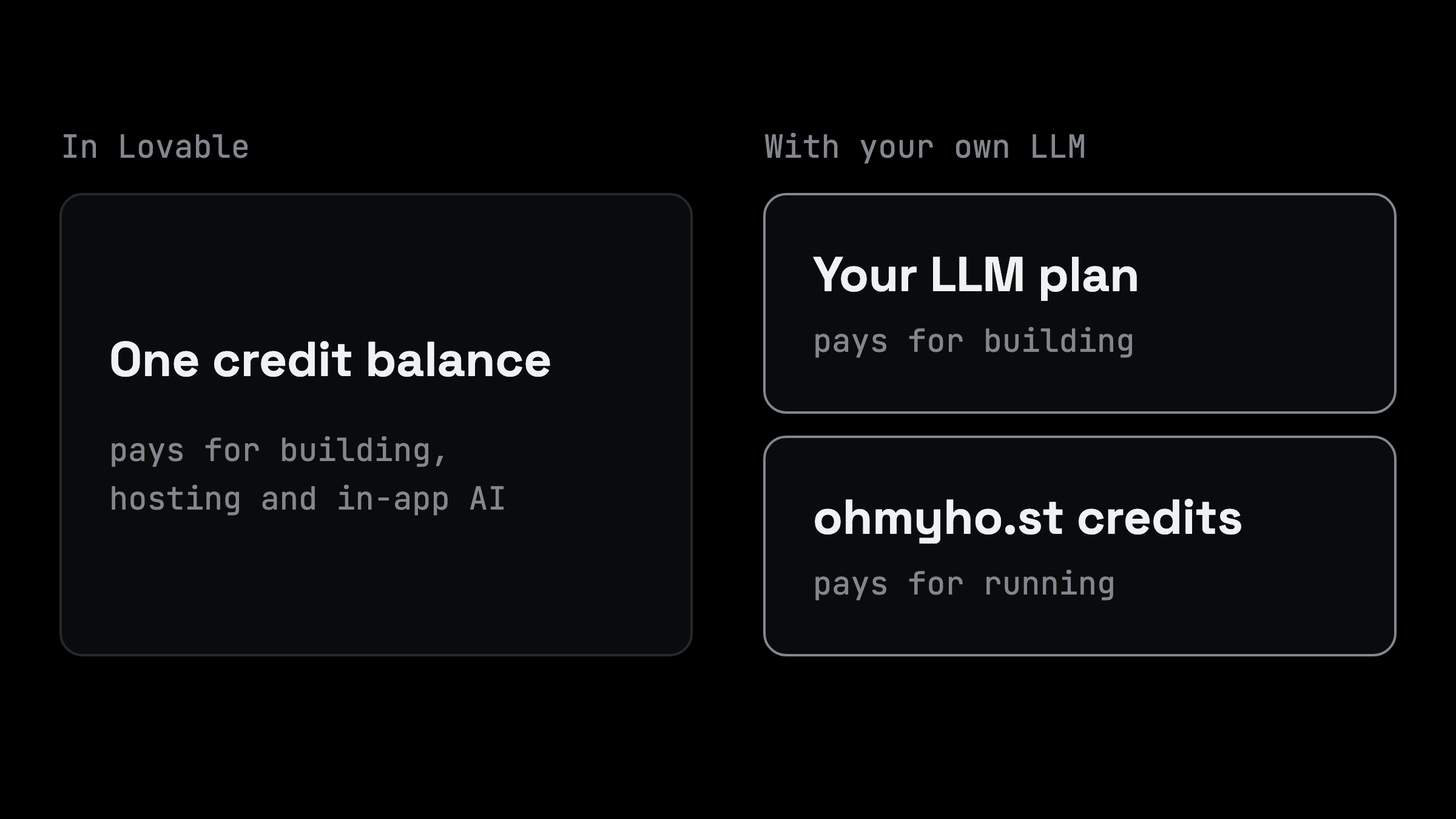
Lovable vs Claude Code, Codex, Cursor and Grok Build
These are not the same kind of tool, which is exactly why they work well together.
| Tool | Where you work | Who pays for the model | How it deploys to ohmyho.st |
|---|---|---|---|
| Lovable | Browser: chat and live preview | Lovable workspace credits | Through the GitHub repository |
| Claude Code | Terminal, IDE, desktop app | Your Claude plan or API key | MCP server or the ohmyhost CLI |
| Codex | CLI, IDE extension, ChatGPT app | Your ChatGPT plan or API key | MCP server or the ohmyhost CLI |
| Cursor | Editor and CLI | Cursor plan, or your own keys for chat | MCP server from mcp.json |
| Grok Build | Terminal | SuperGrok or X Premium+ | MCP server or the ohmyhost CLI |
Which one should you pick? If you like the chat-and-preview feel of Lovable, Cursor is the smallest jump: an editor with the agent in a side panel, and your app running next to it. If you would rather describe a goal and review the result, Claude Code, Codex and Grok Build work from a terminal and feel closer to Lovable's own loop of asking and checking. All four read the same repository, so you can switch later without moving anything.
Claude Code, Codex and Cursor have documented setups in the get-started Skill and at https://docs.ohmyho.st/agents/mcp. Grok Build says "MCP servers all work out of the box", but we have not published a Grok-specific setup yet. Let the agent read the Skill and check its own installed help instead of guessing a command; any agent that can run a terminal command can also use the ohmyhost CLI directly.
Step 1: export your Lovable project to GitHub
Lovable's GitHub integration is available on all plans, and it creates the repository for you (Lovable GitHub integration, read 2026-09-25). It can only export to a new repository, not connect an existing one, so do not create one on GitHub first.
- Add a GitHub connection to the workspace, once. A workspace admin or owner opens Workspace settings → Git → GitHub → Add connection and authorizes the GitHub account or organization.
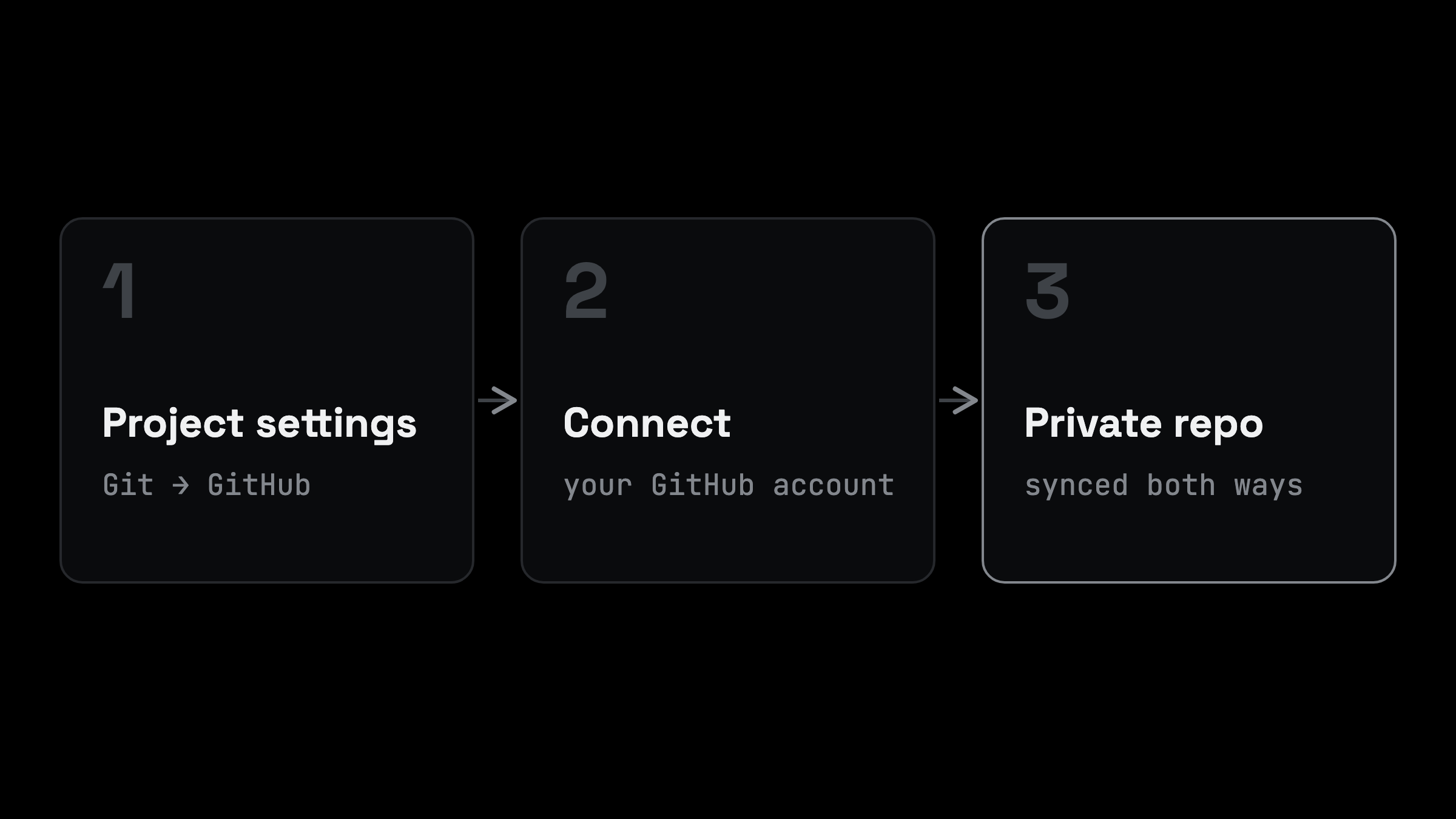
- Open the project's Git settings. In the project, go to Project settings → Git → GitHub. The chat's + menu has the same entry under Project → GitHub.
- Click Connect next to the account or organization that should own the new repository.
- Wait for the first sync. Lovable creates the repository, private by default, and starts two-way sync on the default branch, usually
main. Open it on github.com and check thatpackage.jsonandvite.config.tsare there.
From then on, every change in Lovable lands as a commit, and every commit pushed to that branch shows up in Lovable. If you rename the repository, sync continues; if you delete it, sync breaks. The ohmyho.st side of the connection is described at https://docs.ohmyho.st/github.
Step 2: open the repository in Claude Code, Codex, Cursor or Grok Build
Clone the repository and start your agent in its folder:
git clone https://github.com/you/your-lovable-app.git
cd your-lovable-app
claude
claude starts Claude Code and codex starts Codex; in Cursor you open the folder, and Grok Build starts from the same folder in your terminal. Nothing about the code is Lovable-specific. It is a standard Vite and React project, so the agent can install and run it locally with the package manager its lockfile names.
If you keep prompting in Lovable, both sides write to the same branch. Pull before your agent starts a larger change, and let one tool write at a time. That is the whole discipline a two-way sync asks for.
Step 3: set up ohmyho.st with one prompt
Paste this into the agent, in the repository folder:
Read https://ohmyho.st/llms.txt and https://ohmyho.st/skills/ohmyhost-get-started/SKILL.md. Connect this agent to ohmyho.st and deploy this GitHub project using only the capabilities it needs. After signing in, use the user and organization that whoami reports; never guess an account, organization or project ID. Follow the deployment Skill, keep my existing project decisions and verify the app.
What happens next:
- The agent reads
llms.txtand the get-started Skill, checks what is installed, and installs the ohmyho.st CLI and MCP server only if they are missing. Setup per harness: https://docs.ohmyho.st/agents/mcp. - It signs you in.
ohmyhost loginreturns a link and a code, and you confirm once in the browser. A new account starts on Free. - It connects GitHub with
github_connect. You open the authorization link and allow the repository. GitHub is the only deployment source, so nothing is uploaded from your machine. - It creates the project. The region, US by default or EU if you ask, is chosen once and cannot change later.
- It links the repository with
source_linkand asks for a deployment plan: the commit, the framework it detected and any secret the app still needs. - For each secret it hands you the command
secret_set_commandreturns, which reads the value from stdin, so the key never enters the chat. PublicVITE_values stay in the build; private keys never get that prefix. Details: https://docs.ohmyho.st/secrets. - It deploys to Dev, opens the
dev-….check.omh.staddress and checks the app: a page, a deep link after a reload, and sign-in if the app has one. - When you are happy, it promotes the verified artifact to Prod. Promotion moves the same build: it does not rebuild, and it does not copy Dev data into Prod. Details: https://docs.ohmyho.st/environments.
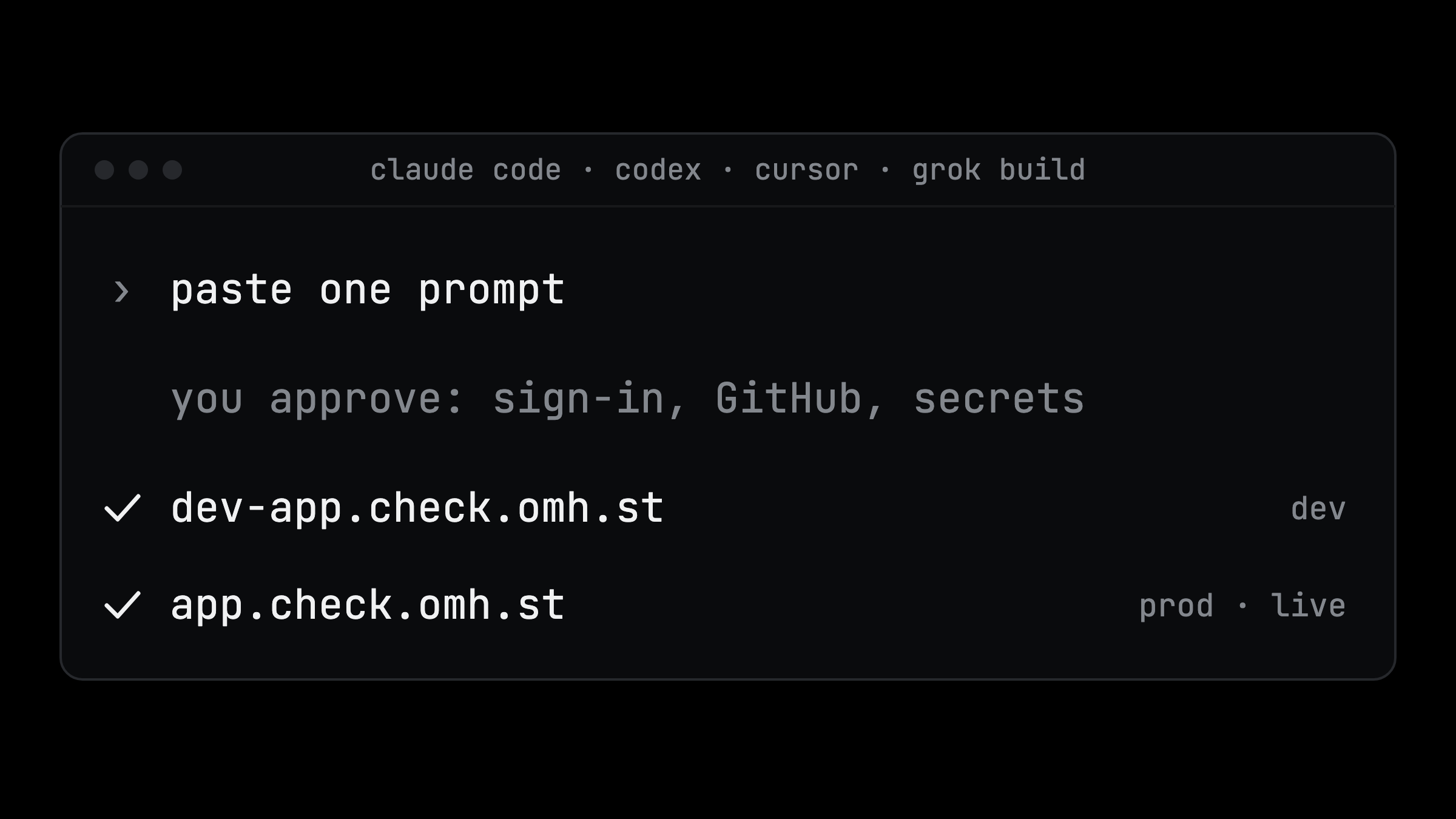
The full walk-through, from the prompt to a verified URL, is in the quickstart at https://docs.ohmyho.st/quickstart.
What changes, and what stays in Lovable
- Lovable keeps working. The sync is two-way, so you can still prompt there. Your agent deploys whichever commit you choose, and nothing in Lovable has to be switched off.
- Supabase can stay. If the app uses Supabase, keep it for the first move. The three
VITE_SUPABASE_*values stay in the repository's.env, and you add the new Dev and Prod hosts to Supabase's Redirect URLs. Moving to managed Postgres is a separate, later step. - Client-side routes need a fallback. A reload on
/dashboardmust serveindex.html. The agent checks this on Dev and adds the Vite companion thatohmyhost initreturns when it is missing. Framework notes: https://docs.ohmyho.st/frameworks/vite. - Lovable Cloud data moves on its own schedule. Export it before you switch anything off, and treat that move as its own step with its own check.
The longer checklist for these seams, with Lovable's own wording for each, is in Hosting a Lovable app after export.
What it costs
Two separate lines, which is the point of the whole move.
The model costs whatever you already pay for Claude, ChatGPT, Cursor or SuperGrok. ohmyho.st does not resell tokens and never needs your LLM key.
Hosting runs on ohmyho.st credits. Free gives 200 credits a UTC month with hosting, a database and Dev and Prod hosts, which is enough to deploy an exported Lovable app and click through it. Paid is $10 a month for 1,000 credits and adds your own domain and transactional mail. Extra projects carry no base fee; each draws on the same balance. A Lovable frontend that keeps Supabase and runs on its own domain looks like this:
| Item | Credits |
|---|---|
| 10 build minutes | 12.05 |
| 100,000 requests | 9.86 |
| 1M CPU-ms | 6.57 |
| 1 deployed script | 6.57 |
| 1 custom hostname | 32.86 |
| Total: A Lovable frontend that keeps Supabase, with its own domain, for one month | about 67.91 |
About $0.68 of credit value at the standard rate.
The line-by-line rates are on the pricing page and in the cost breakdown.
When Lovable is still the better choice
If you never want to see a file tree or a terminal, Lovable is simpler: chat, preview and publish, all in one tab. Visual edits, the instant preview and Lovable Cloud's built-in backend are real strengths, and a first prototype is faster there than almost anywhere else. Many people use both: Lovable for the first screens, their own agent once the app has users and changes need more care. Because the GitHub sync runs both ways, that is a choice you can revisit every week, not a migration you make once.
FAQ
Is there a free Lovable alternative?
Your coding agent needs its own plan, but hosting on ohmyho.st starts on Free with 200 credits a UTC month, enough to deploy an exported Lovable app to Dev and Prod. Open-source builders such as Dyad also let you bring your own key; they replace the builder, not the host.
Can I keep using Lovable after moving to Claude Code or Cursor?
Yes. The GitHub sync is two-way on one active branch, so prompts in Lovable still land in the repository you deploy from. Let one tool write at a time and pull before a larger change.
Do I need an API key for Claude Code or Codex?
No. Claude Code signs in with a Claude plan and Codex with a ChatGPT sign-in; both also accept an API key if you prefer usage-based billing. ohmyho.st never needs that key. The agent signs in to ohmyho.st on its own, with a browser login or an ohmyho.st API token (https://docs.ohmyho.st/login-tokens).
Does Grok Build work with ohmyho.st?
Grok Build runs terminal commands and supports MCP servers, so it can use the same ohmyho.st MCP server or CLI as the other agents. We publish documented setups for Claude Code, Codex and Cursor, not yet for Grok Build, so let the agent follow the Skill and its own installed help rather than a guessed command.
Will my Lovable repository become public?
No. Lovable creates it private by default, and ohmyho.st reads it only through the GitHub App installation you authorize for that repository.
Sources
- Lovable pricing, read 2026-09-25
- Lovable GitHub integration, read 2026-09-25
- Lovable AI features for your app, read 2026-09-25
- Claude Code setup and authentication, read 2026-09-25
- Codex authentication, read 2026-09-25
- Cursor API keys, read 2026-09-25
- Introducing Grok Build, read 2026-09-25
Bring your app from Lovable · Deploy from Claude Code · Deploy from Codex · Deploy from Cursor